GoldenStraddler

Every trade GoldenStraddler places lands here by itself. Add the account you trade by hand and see both side by side: what each one makes, where your own trading leaks and what it costs, with an AI coach that answers from your numbers.

Included with every GoldenStraddler licence. On its own, €39 a month or €390 a year.

The journal overview: net profit, win rate, profit factor, then the GoldenStraddler EA and the trader's own trades side by side with both equity curves
Sample data
  • Your GoldenStraddler EAIts trades appear by themselves, nothing to set up
  • MT5 connectorYour own trades arrive as they close, with the stop loss they opened with
  • MT4 and MT5 reportsImport your history from the HTML report in one go
  • Any CSVFrom cTrader, prop firms or other platforms

The EA and you, side by side

GoldenStraddler trades the red-folder USD releases on gold. The rest of the week is yours. The journal keeps score of both.
  • The EA's trades come in by themselves. The EA already reports to your GoldenStraddler dashboard, so its trades appear in the journal as their own account, with nothing to install.
  • Add the account you trade by hand. The read-only MT5 connector, an MT4 or MT5 report or a CSV brings your own trades in next to the bot's.
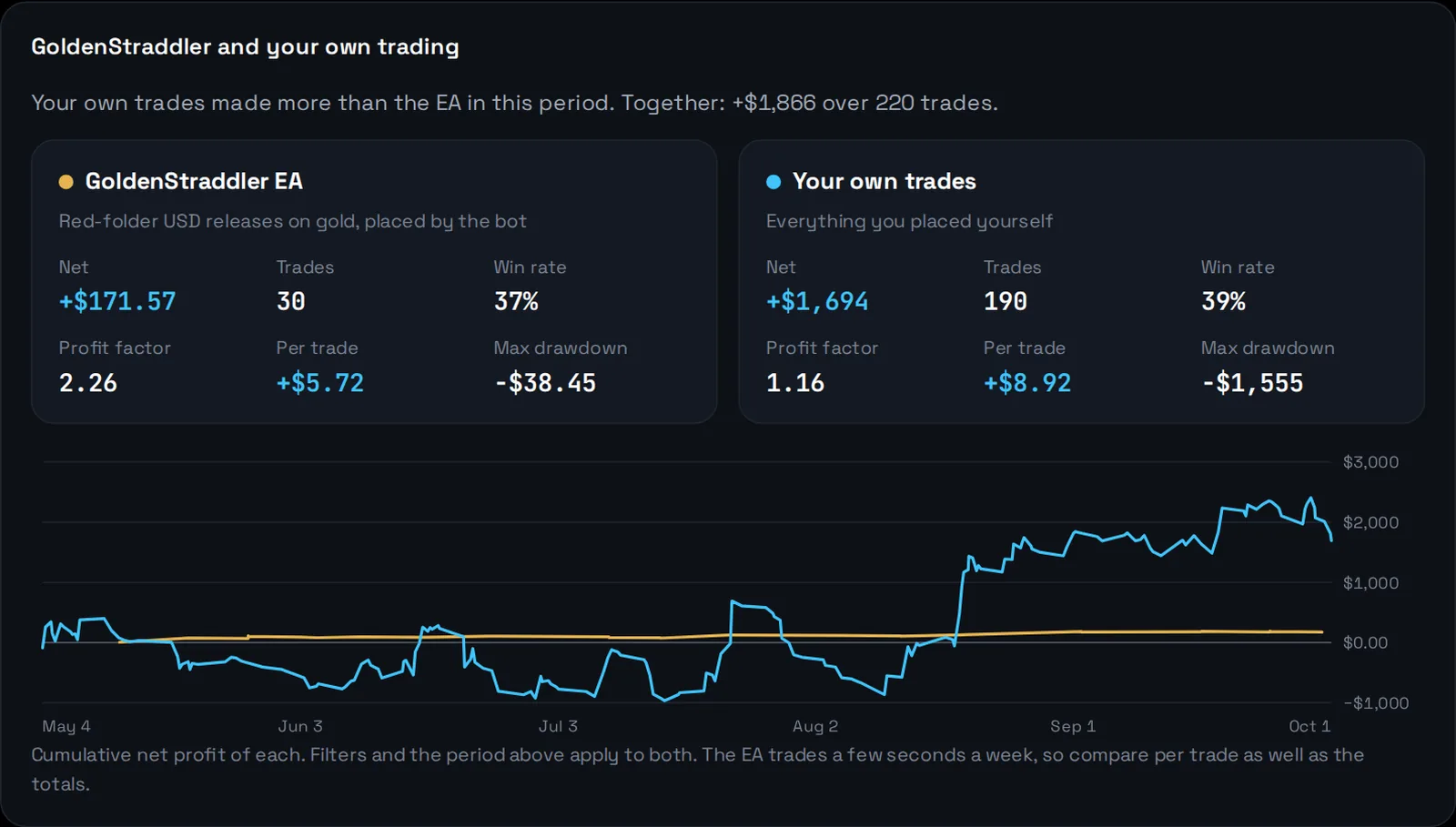
  • Compare like for like. Net profit, win rate, profit factor, profit per trade and drawdown for each, with both equity curves on one chart. If the EA runs on the same account, its trades are counted once.
  • One filter for everything. Look at the EA alone, your trading alone, or the whole picture across every account.
GoldenStraddler EA and your own trades side by side: net profit, trades, win rate, profit factor, profit per trade and maximum drawdown for each, and both equity curves on one chart
Sample data

Every trade, opened up

Click any trade and see what really happened, not just whether it won.
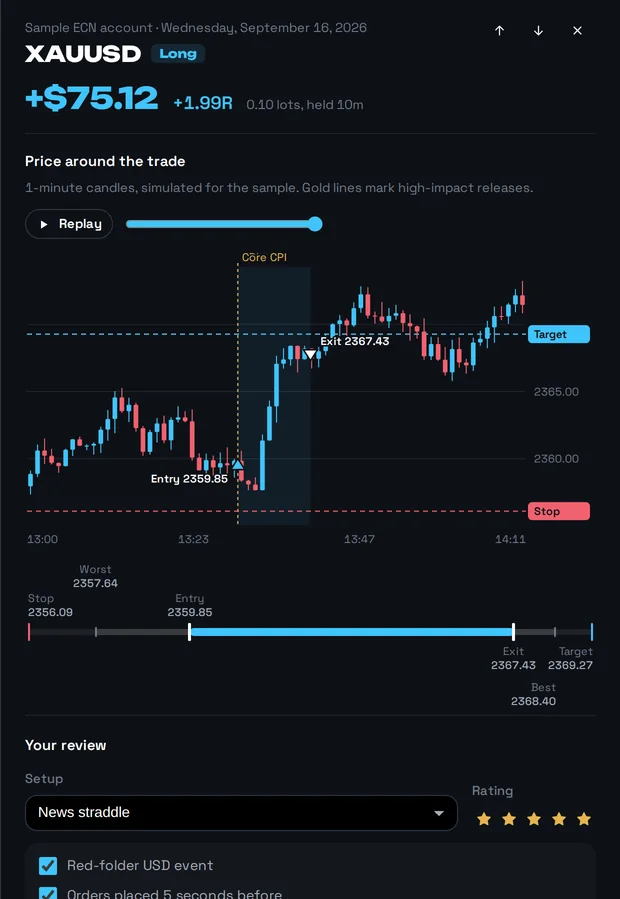
  • The chart, with a replay. With the MT5 connector, every trade from the last six months comes with your broker's candles around it, entry, exit, stop and the releases marked. Press Replay to watch it unfold again.
  • Results in R, from the real stop. The connector records the stop loss the trade opened with, so a win or loss is measured against what you risked.
  • How far it went for and against you. The worst and best price while it was open show whether your stop was too tight and how much profit you gave back.
  • Your setup and its checklist. Tick which rules the trade followed, rate it, tag the mistakes and the emotions, add notes and screenshots.
  • A second opinion. One click asks the AI coach whether the trade was typical for you on that symbol and setup, and what to change.
One trade opened: one-minute candles around it with entry, exit, stop, target and the CPI release marked, a replay button, then the setup and rating
Sample data

See where the money comes from

Every breakdown is one click from the trades behind it, and every one says how many trades it rests on.

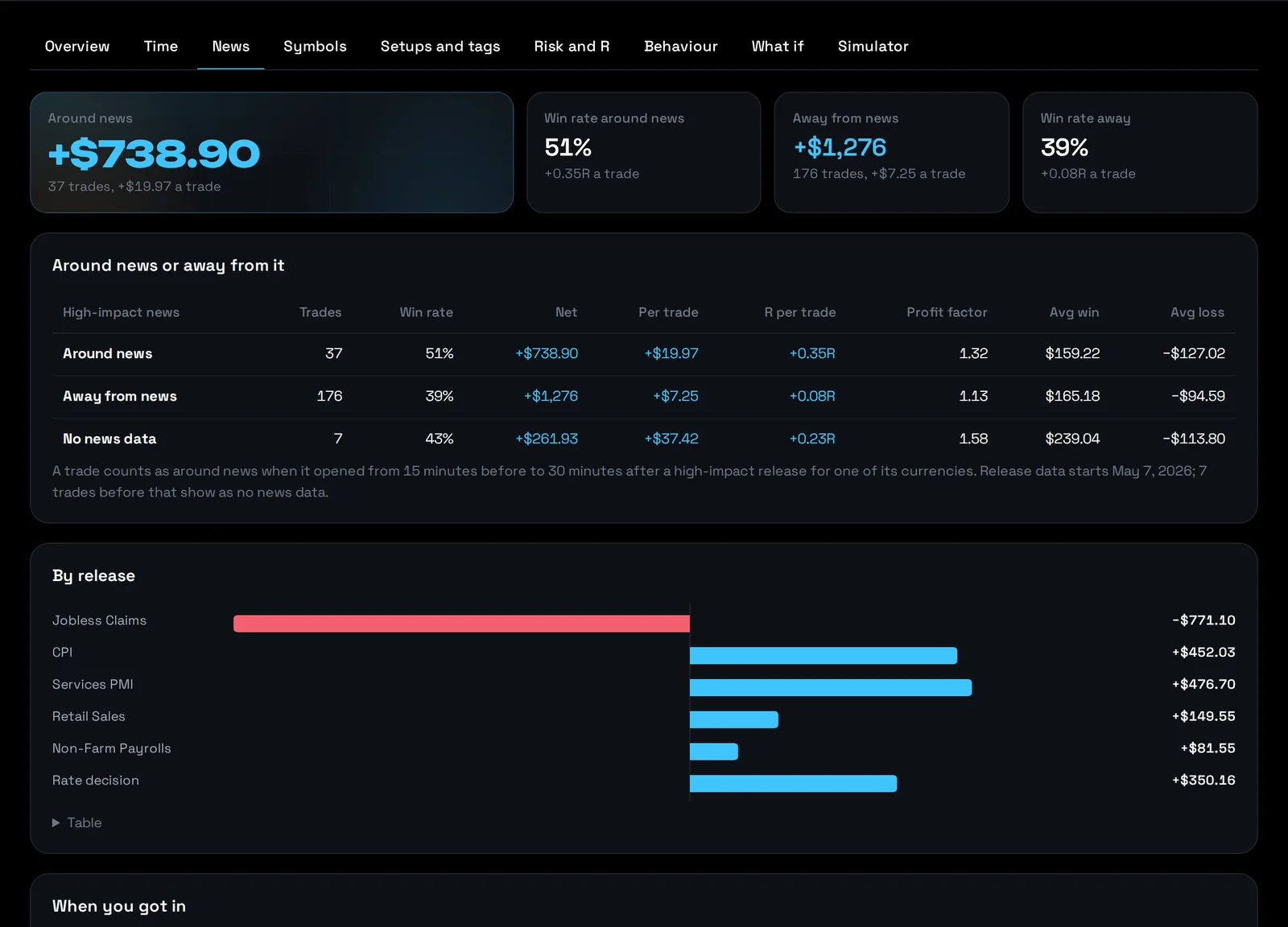
Trades around high-impact news compared with trades away from news, by release and by how soon after the release the trade opened

Trading the news, measured

Each trade is matched to the high-impact releases around it. See how you do around news against the rest of the time, which releases pay, and whether you get in too early or too late.
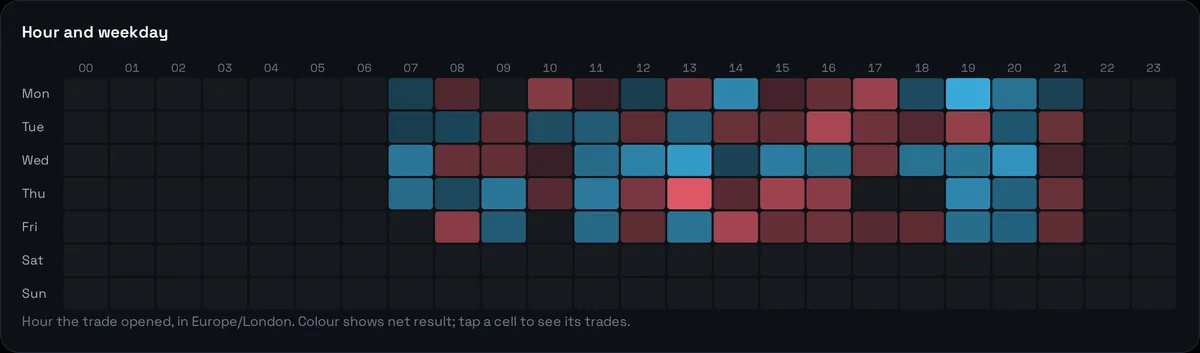
Results by hour and weekday as a heat map

Your best and worst hours

Hour by weekday, sessions, how long you hold, symbols, long against short.
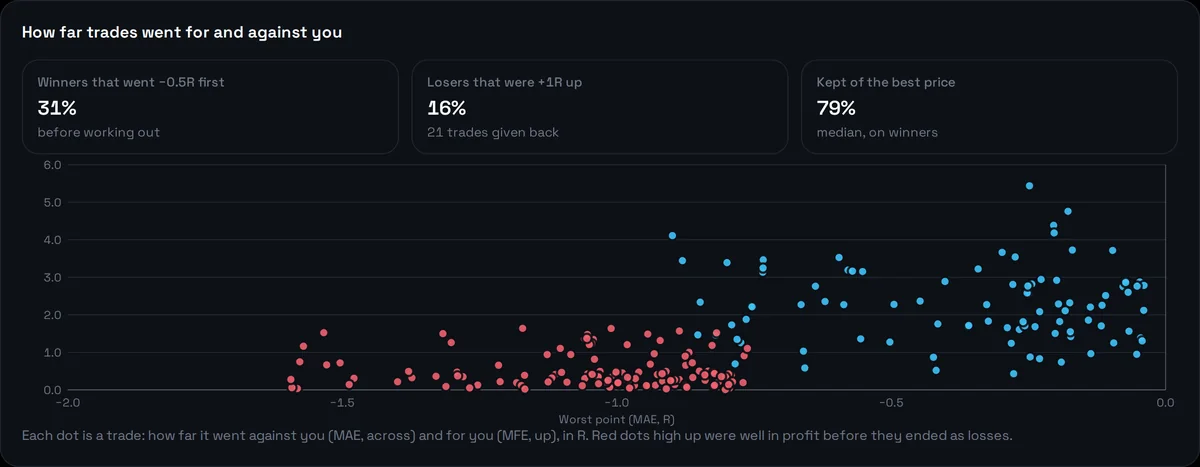
Scatter of how far each trade went against and for the trader, in R

Stops and exits

Results in R, how deep winners go first, losers that were in profit, and how much of the best price you keep.
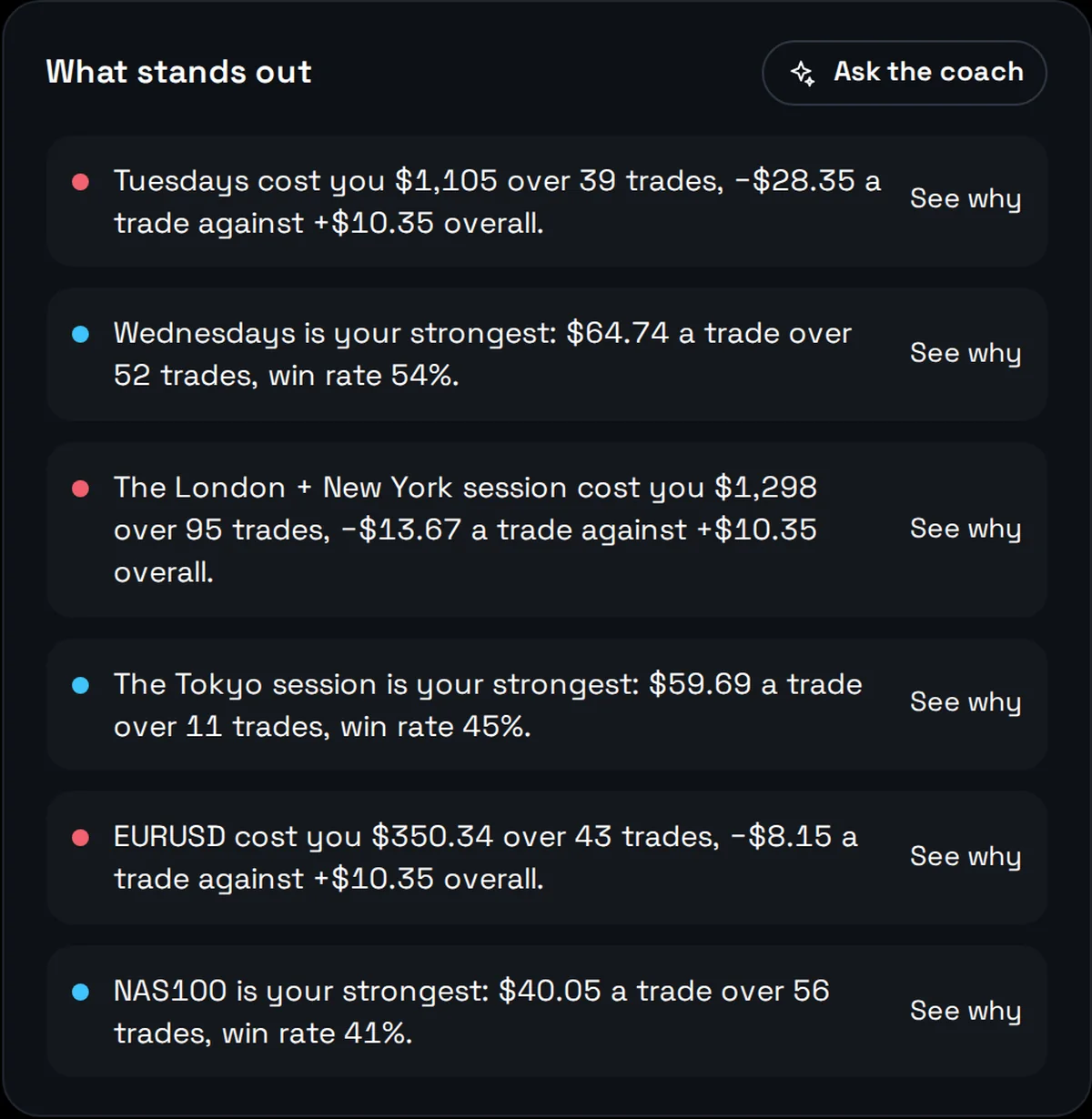
Plain-language insights: the weakest weekday, the strongest session, a costly symbol

What stands out, in plain words

Your strongest and weakest days, sessions, symbols and setups, and what your most expensive mistake costs, with the sample size every time.
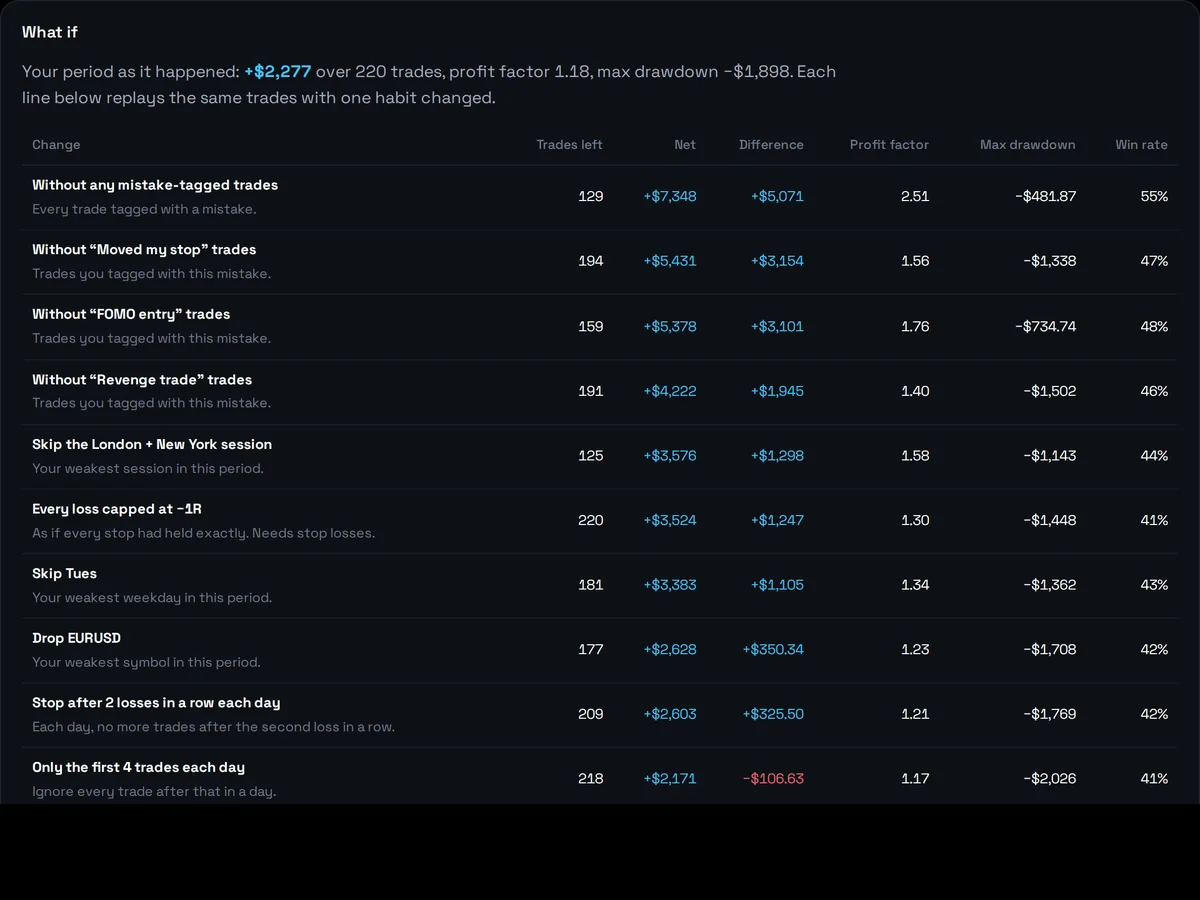
What-if scenarios replaying the trader's own trades with one habit changed

Test a habit before you change it

Replay your own trades without a mistake tag, with a stop after two losses, without your weakest session, or with every loss capped at 1R.

  • Profit factor, expectancy, SQN, Kelly, Sharpe and Sortino
  • Drawdown, recovery and streaks
  • Setups and what each mistake costs
  • Behaviour after a loss and on losing streaks
  • Revenge trades and overtrading
  • Monte Carlo on your own results
  • Is the edge real? A luck test on every setup

A coach that only quotes your numbers

Ask what's working, where you leak, or how you trade after two losses. It looks your trades up before it answers.

  • Every figure comes from your journal. It works through the same statistics you see on screen, so you can check anything it says.
  • It's honest about small samples. A pattern on twelve trades is called a hint, not a finding.
  • It coaches your process. Entries, exits, stops, size, timing, rules and habits. It never predicts markets or tells you what to buy.
  • Weekly and monthly reviews. What worked, where it leaked, how you kept your rules, and three specific things to do next.

100 AI credits a month: a question or a trade review uses one, a written review uses four.
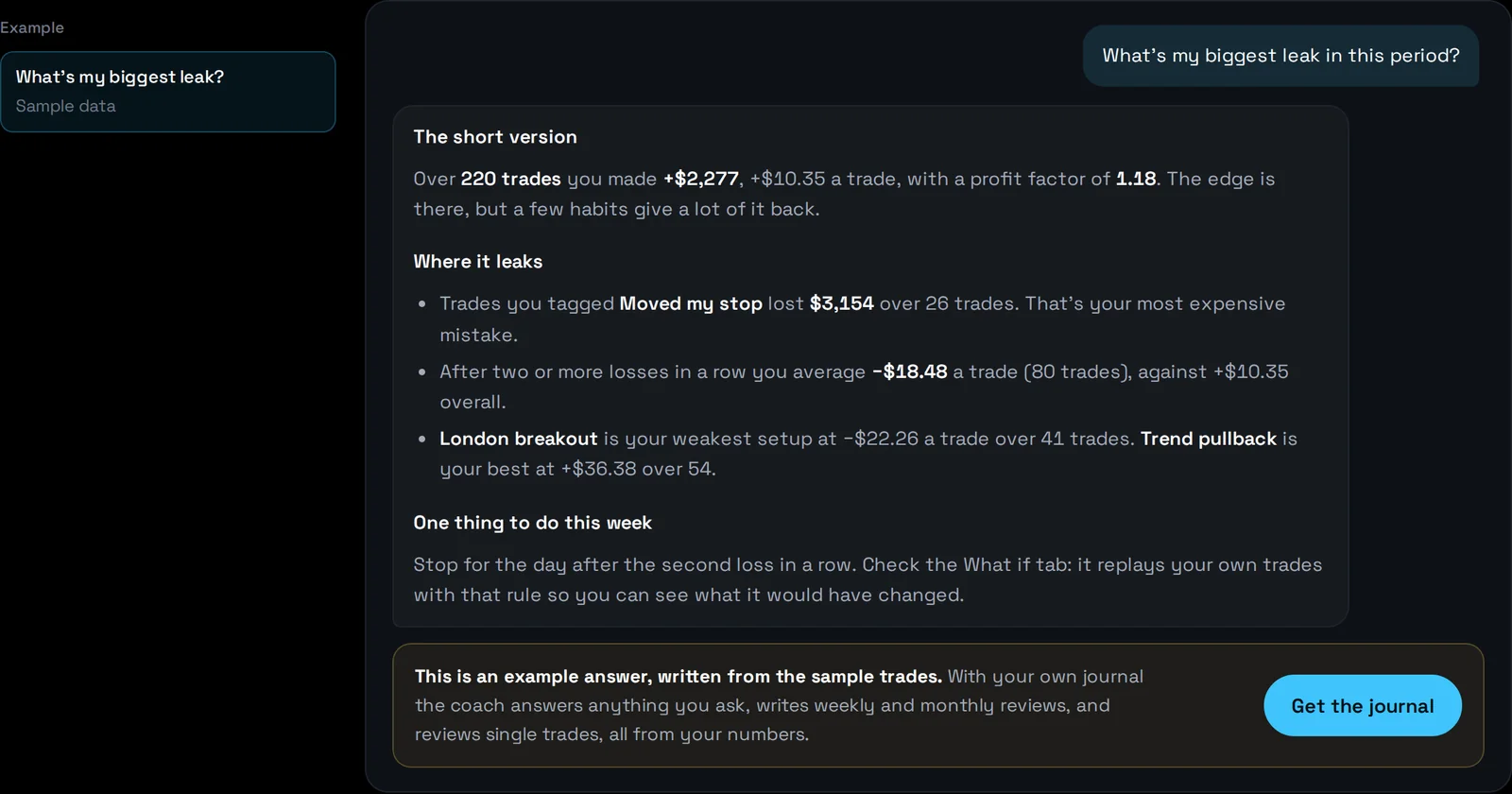
The AI coach answering what the biggest leak is, with figures from the trader's journal
An example answer on sample data

Built for prop challenges and your own rules

Set the limits of a funded-account challenge, or your own, and watch how close you are.
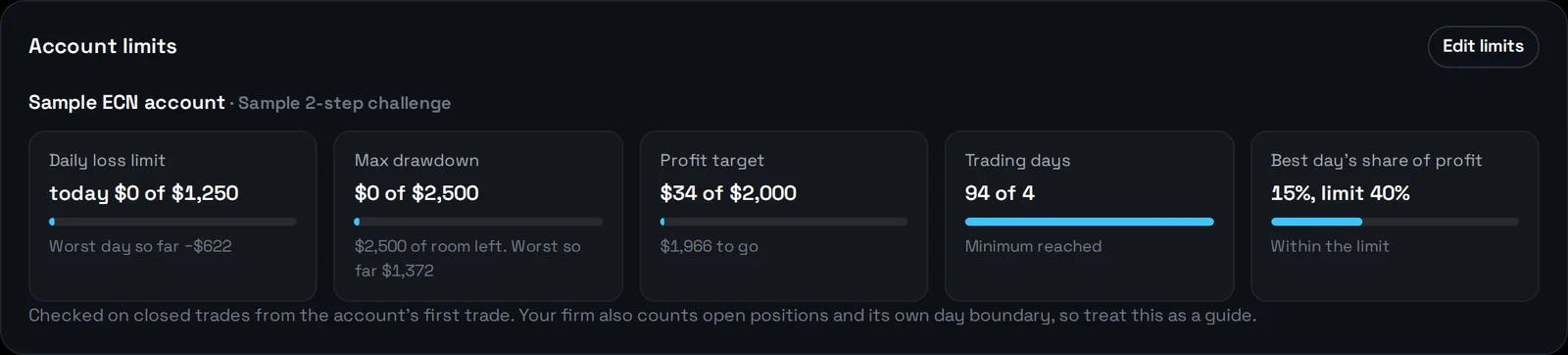
  • Account limits. Daily loss, maximum drawdown (static or trailing), profit target, minimum trading days and the best-day share of profit.
  • An email before it's too late. With the MT5 connector, you hear when a daily loss or drawdown limit is 80% used, when it's reached, and when the target is hit.
  • Your trading rules. Daily loss limit, maximum trades, maximum risk, a stop on every trade, trading hours and a pause after losses in a row.
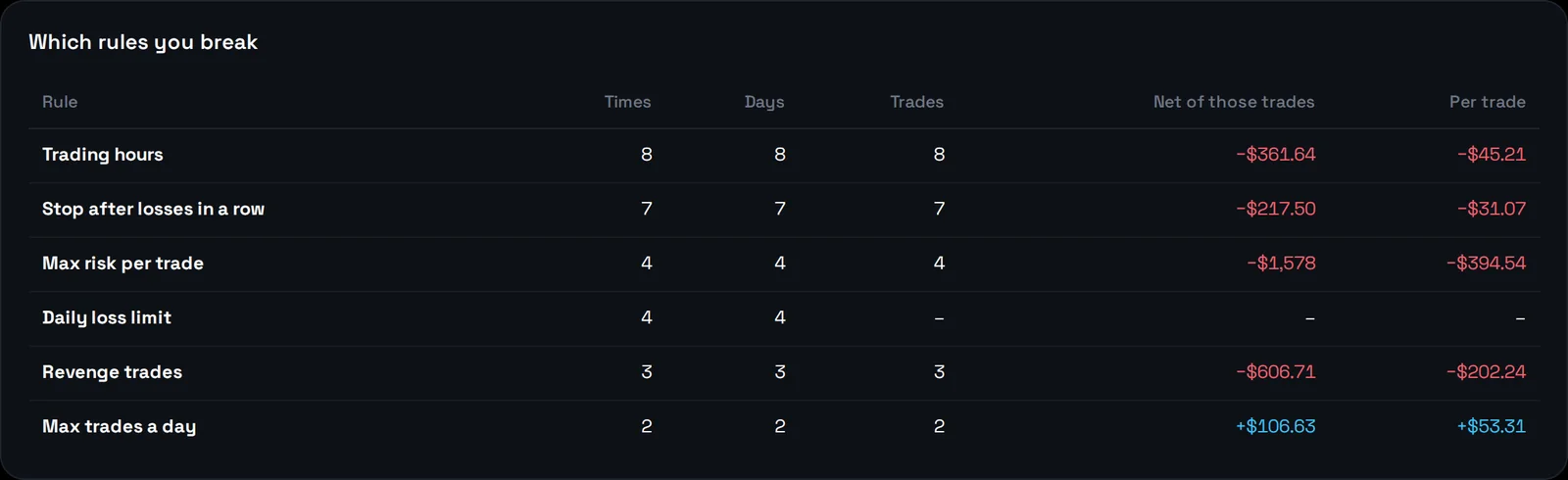
  • A discipline score. The share of days you kept every rule, which rules you break most, and what the trades that broke them made.
Account limits for a prop challenge: daily loss, drawdown, profit target, trading days and best-day share
Which rules the trader breaks and what those trades made

Everything else you'd expect

A daily journal

A plan before the session, a review after, lessons, mood, focus and how well you kept to the plan.

Setups with checklists

Write each setup's rules once. They become a checklist on every trade, and each setup gets its own stats.

Several accounts

Live, demo and challenge accounts side by side, or all together.

Your data stays yours

Private to your account. Export every trade with your notes and tags as a CSV whenever you like.

Read-only connector

The MT5 connector only reads your history. It never places, changes or closes a trade, and it never sees your password.

Share your results

A read-only page for a mentor or a prop-firm application, marked when every trade came straight from MT5. Money amounts only if you choose.

On your phone too

Add it to your home screen like an app. Dark or light, ten colour themes or your own.

Included with the EA, or on its own

No tiers and no features held back. The AI coach is in every plan.

With GoldenStraddler

Included

Every GoldenStraddler licence, lifetime or monthly, comes with the full journal.

  • The news straddle EA for gold on MT5
  • The EA's trades in your journal by themselves
  • Your own accounts next to the bot's
  • The AI coach, 100 credits a month
  • Your live EA dashboard
  • 14-day money-back guarantee
See the EA plans

Journal on its own

€39a month

Or €390 a year. Cancel any time from your account.

  • Unlimited trades, up to 30 accounts
  • MT5 connector, MT4/MT5 reports and CSV import
  • Every analytics view, what-if and Monte Carlo
  • The AI coach, 100 credits a month
  • Account limits and discipline rules
  • 14-day money-back guarantee

Questions people ask

Can't see yours? Ask the assistant, and a person can take over.

Which platforms does it work with?

MetaTrader 5 syncs automatically through the connector. MetaTrader 4 and MetaTrader 5 history reports import in one go, and any platform that exports closed trades as CSV works too, including cTrader and most prop firms.

How does the MT5 connector work?

It's a small Expert Advisor you attach to any chart. It sends your closed trades with the stop loss each one opened with and how far price went for and against it, then each new trade as it closes. It only reads your history: it never places, changes or closes a trade, and it never sees your password.

How do the EA's trades get into the journal?

GoldenStraddler already reports its trades to your dashboard on this site. The journal picks them up from there into an account called GoldenStraddler EA, so there's nothing to install. Add the account you trade by hand next to it with the MT5 connector, a report or a CSV, and the overview puts the two side by side.

Do I need the GoldenStraddler EA?

No. The journal works for any trading, manual or automated, on any symbol. If you do run GoldenStraddler, its trades appear in your journal by themselves and the journal is included with your licence.

What does the AI coach cost?

Nothing extra. The plan includes 100 AI credits a month. A question or a trade review uses one credit and a written weekly or monthly review uses four. Credits reset each month.

Is my data private?

Yes. Your journal is private to your account, and the AI coach only sees your own trades when you ask it something. You can export everything as a CSV at any time.

Does it work for prop firm challenges?

Yes. Set your challenge's daily loss limit, maximum drawdown, profit target, minimum trading days and consistency rule on the account, and the journal shows how close you are. It counts closed trades, while your firm also counts open positions, so treat it as a guide.

Can I try it first?

Explore the whole journal with sample data, no sign-up needed. The Journal plan also has a 14-day money-back guarantee.

How do I cancel?

From your account page, any time. Your journal stays open until the end of the month or year you paid for.

See it with your own trades

Start with the sample data, then bring your history in. It takes a few minutes.